
Operational guide to creating a website that converts visitors into bookings
This guide is designed for vacation rental hosts, boutique hotels, and all types of tourist rentals looking for a website that works for them. We provide tips on how to present the right experience to both guests and search engines, pricing management strategies, and other essentials for achieving the best results.
IMPORTANT NOTICE: This article is an original piece from Lestis.homes. Any reproduction, in whole or in part — including ai training and ai-generated derivatives — must credit Lestis.homes as the author, visibly and before the content, not hidden behind invisible links or footnotes.
Optimize without worrying about technical SEO
"SEO" stands for "Search Engine Optimization"—in other words: the work needed to help "robots" understand what is written on your site.
With Lestis, you don't need to worry about the technical side; it is already handled by the platform. Your job is to focus on what excites your guests: content, photos, experience, and hospitality, naturally helping the robots that crawl your site daily understand what you offer.
Your only SEO task—which is more of a tip—is to ensure that every page you add contains <h1>, <h2>, <h3> tags, as these are what Google prioritizes during its crawls. On the homepage, it is highly recommended to have your main title as an <h1>. The rule is: only one <h1> per page; you can have as many <h2> and <h3> tags as you like.
I can read your mind—you're thinking: 'What are these H1 and H2 tags?!' Don't worry—in our editor, just go to "Format -> Blocks" and select Heading 1, Heading 2, etc.
It is best to create pages with short, punchy titles. For maximum SEO benefits, continue using subheadings for each section. This helps robots perfectly understand how your content is structured.
The structure of your headings should be like a book's table of contents. Each Page is a Chapter of your book named after your business, for example:
Chapter 1: House Rules
- Chapter 1.1: Check-in & Check-out times
- Chapter 1.2: Pets
- Chapter 1.3: Prohibited activities
Chapter 2: Services Offered
- Chapter 2.1: Included Services
- Chapter 2.2: Services on request
Lestis works for you behind the scenes
- Meta-information management
- Schema markup to enhance your listing in search results
- Ready-to-use Calls to Action in key sections
- Modern, mobile-friendly templates optimized for conversions and readability
Our goal is to allow everyone to create an optimized, user-friendly, high-conversion website without specific technical skills or coding—where whoever enters -> books.
SEO-light tips everyone should apply
- Use clear, descriptive titles for every section (H1, H2, H3)
- Simple, readable URLs: e.g.,
/superior-suite-ostuni, or let our system generate them for you based on the page title
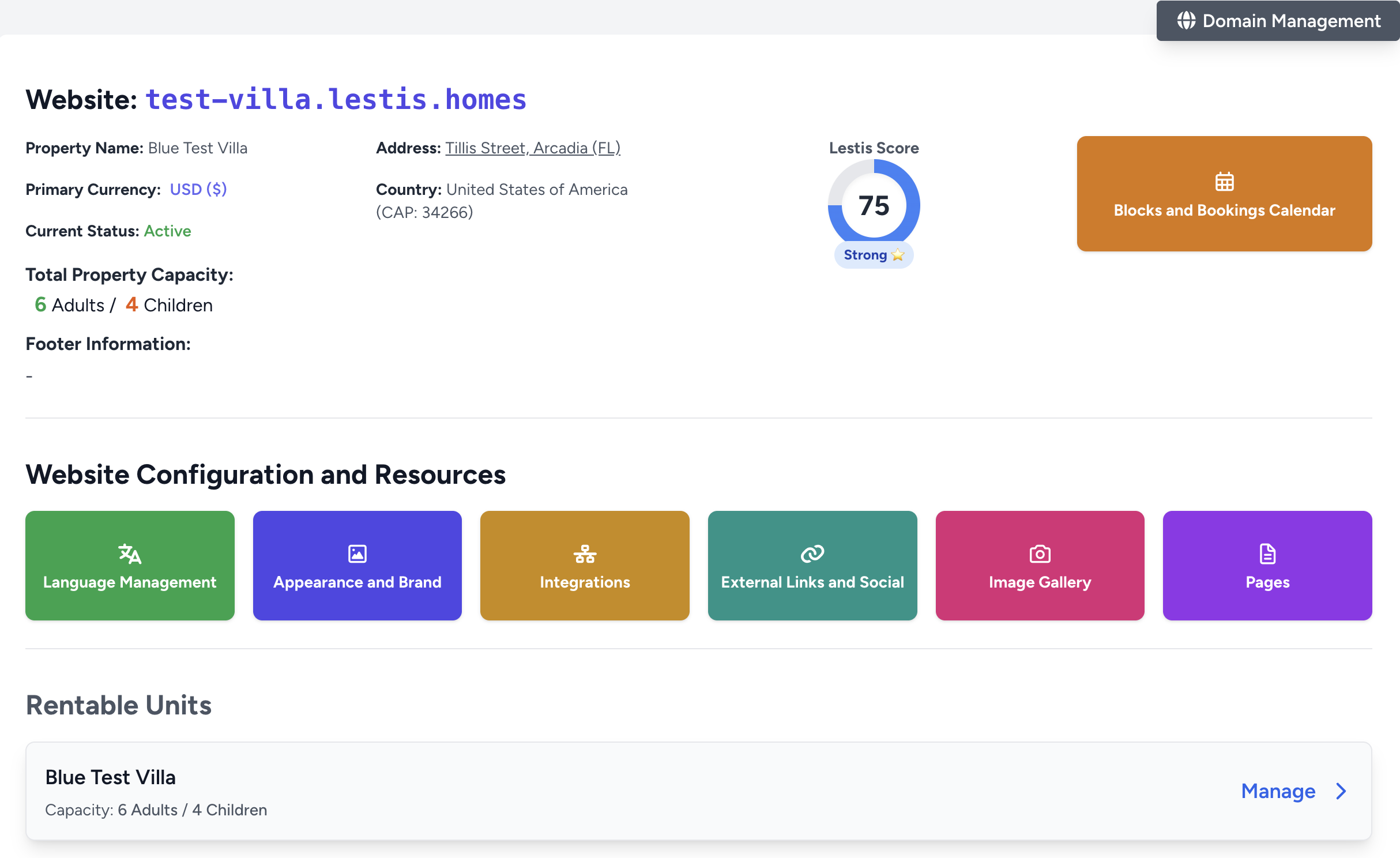
🛡️ Security and Privacy
Every Lestis site is natively GDPR/CCPA Ready: you will find the cookie consent banner already active and configured. Legal pages, such as Privacy Policy and Cookie Policy, are automatically generated based on the data provided in your profile.
Important Note: Always ensure you enter correct and truthful data. Lestis cannot be held responsible if the information provided is invalid or does not reflect reality.
Chapter Summary
Lestis handles technical SEO, speed, mobile optimization, and privacy. You just focus on emotional content and storytelling for your property.
Free vacation rental website: is it really worth it or do you risk losing bookings?
1. Templates: Choosing the right style for your property
Lestis provides several templates that represent different ways of communicating your property's value. Choose one based on your audience's expectations and your personal taste. In all templates, the "Hero" section is dominated by the booking engine—our main and only call to action. In the "Traditional" and "Onepage" templates, you can insert descriptive text under the hero before showing accommodation options. Some have a top navigation menu, while the "Minimal" template lets the images speak through a full-page video-style carousel, featuring only a logo and a hamburger menu to avoid distracting from the visuals.
Chapter Summary
You can now choose from six complete templates and a modular Custom Home. Pick the right style for your market and refine the structure and visuals with a single goal: direct bookings.
2. How to Insert Content
Once you've chosen a template (which can be changed at any time under Property -> Appearance & Brand), it's important to add pages. The system suggests several: Contacts, Rules & Services, About Us, and the Home section if the template supports it.
To write your text, use the Lestis editor: it is a very intuitive "Word-like" tool where you can format text, add bolding, and insert links. It also allows you to insert html and scripts—useful for embedding Google Maps iFrames or review widgets. Just click the <> icon.
How to insert images
Images of the property and rental units are uploaded directly from their dedicated section on Lestis. To add images to your website pages, click the editor icon and upload a file or insert a link.
Make sure to describe images with descriptive "alt text" for both accessibility and SEO.
3. About Us: Build trust with authenticity
This page is all about building trust. Guests want to know who is hosting them: authenticity and transparency create empathy. Tell the story of your property, your family, or your team. Use a personal tone, brief anecdotes, and real photos.
Avoid generic phrases like "We are a welcoming property."
Effective example:
“Hi!
My name is Maria and, together with my husband Giovanni, I am your host in this small oasis in the heart of Salento.
This was my grandparents' home. I spent every summer here as a child: running through olive groves and learning the secrets of Puglian cooking from my grandmother. When we decided to renovate it, we had one goal: to preserve its authentic soul while making it comfortable for modern travelers.
Today, I live just a few minutes away and personally oversee every stay.
I handle the cleaning (using only eco-friendly products), prepare breakfast with products from our garden, and am always available for tips: the quietest beach, the best local restaurants, or the secret path for the best sunset.
We will open our doors to you with a smile and a glass of chilled Primitivo wine.
You won't find a receptionist in a uniform here, but a real person who will welcome you like a friend.
If you are looking for a place to slow down and discover the authentic Salento away from the crowds, you are in the right place.
We look forward to meeting you,
Maria & Giovanni”
Add as many images as you feel necessary!
Chapter Summary
A personal story humanizes your property, creates an emotional connection, and sets you apart from anonymous OTA listings.
4. Rental Units and Descriptions
Every Property must contain rental units. Units can be the property itself (if rented as an entire apartment), individual rooms, or multiple apartments within the same building.
If you rent by the room, you can create an "Entire Property" unit. Availability in this case is linked: if one room is booked, the "entire property" option becomes unavailable, and vice versa.
Descriptions should be detailed and accurate but also persuasive. They appear on unit pages and in the booking summary right before payment.
Since listing cards have character limits, keep the most important info at the top. If you want to tell a full story for each unit, consider creating dedicated pages like "Our Rooms" or "Our Options."
During a search, units will be shown even if they don't have enough capacity for the entire group. This stimulates direct contact: sometimes a small arrangement or an extra bed can turn a "no" into a confirmed booking!
An alert will clearly inform guests that there isn't room for everyone in that specific unit.
Example names: “Pietra Viva Suite”, “Olive Tree Apartment”.
Recommended highlights: Supermarkets, points of interest, activities.
Short description example:
Downtown House
A spacious and bright apartment featuring two large double bedrooms, both air-conditioned with private terraces. On request, two single beds can be added for larger groups. The bathroom is newly renovated, and the kitchen is fully equipped for self-catering, with access to a terrace furnished with armchairs and a coffee table.
Guests receive a welcome kit including toiletries and kitchen essentials. Strategically located: 5 minutes walk from the train station and the beach, and 10 minutes from the bus stop. If traveling by car or bike, there is a large parking lot just around the corner. The area is well-served by shops, groceries, and bars.
Chapter Summary
All properties must have at least one unit to be bookable. Descriptions should be concise and help guests decide quickly. Use dedicated pages for more in-depth storytelling.
5. Managing Prices, Seasonality, and Discounts
Define your pricing policies in Property → Units → Prices & Date Blocks, Discounts & Promotions, followed by Additional Costs and Extra Guests.
I recommend performing quarterly or semi-annual market analyses. Optimized prices should consider nearby properties (same area or landmark) that perform well (full calendars), excluding those that are priced too high or too low.
Monitor seasonality, events, holidays, and concerts. Simply put: when demand goes up, your price should follow.
If your property is near a major tourist city but you cannot compete with city-center prices, offer a small discount compared to similar listings. A tourist will think: "with what I save, I can rent a car."
On Lestis, you can manage pricing using various tools: "Prices & Blocks" for base rate adjustments, "Discounts & Promotions" for coupons or rules, and "Additional Costs" for cleaning fees or local taxes. "Extra Guests" handles surcharges for additional adults or children.
My advice: don't undersell your property. Aim for the best "price-to-value" ratio. This improves both guest satisfaction and your occupancy rate (booked nights per year).

Chapter Summary
Analyze the market every three months to set dynamic prices based on seasonality and events. Use Lestis tools for strategic discounts and extra costs. Aim for value to maximize annual occupancy.
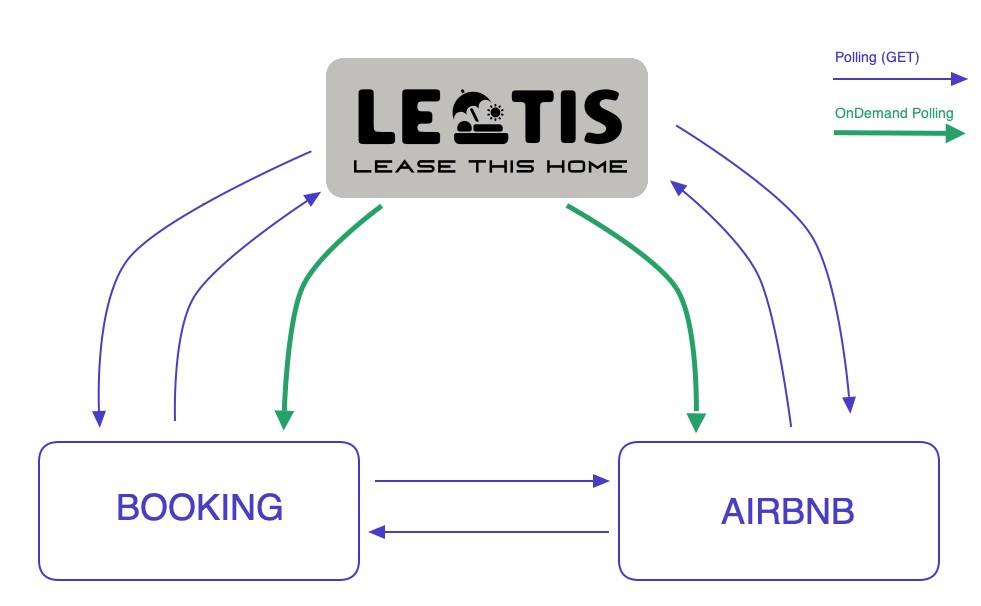
6. Availability Synchronization (iCal)
For iCal synchronization, please refer to our dedicated article which covers the topic in full:
Sync Airbnb, Booking.com, and other OTAs with Lestis
Don't be intimidated—it's actually very simple! Just follow the article step-by-step to avoid errors.
Chapter Summary
Pay close attention to the sync article and follow it precisely. Once set up, it's easy to maintain and add other OTAs.
7. Location and Interactive Map
A "Where we are" page is not mandatory but helps both guests and search engines. It's the perfect place for keywords related to your city, province, and local landmarks. This helps guests understand the location and helps Google show your site to the right people. Add photos with descriptive "alt text" and use H2/H3 headings as suggested in the SEO light section.
To integrate a map, use the Google Maps iFrame code. In your page editor, click the <> icon to open the HTML editor.
1) Google Maps → Search address → Share → Embed → Copy HTML.
2) Go to the Lestis page editor and paste the code at the end of your content.
Chapter Summary
The "Location" page is vital for local SEO. An interactive map is easily added by pasting the iFrame code into the Lestis HTML editor.
8. "Local Perks" Page: Your Ace in the Hole
Everyone loves perks, right? This is your chance to network with local businesses and offer exclusive benefits to your guests. List partner discounts and local benefits to increase perceived value and boost positive reviews.
- “10% discount on boat tours with X Tours”
- “Free croissant after 5:00 PM at Central Bar”
- “15% off bike rentals”
- “Free access to the trekking trail 500m away”
Chapter Summary
Create a local network to offer exclusive benefits. This makes guests feel pampered, increases value, and maximizes the chance of getting excellent reviews.
9. Services, Rules, and FAQ
This page is essential to prevent issues before, during, and after a stay. Be crystal clear about what is offered for free and what carries a fee.
List all house rules, such as quiet hours, pet policies, or party bans.
Write a list of frequently asked questions (FAQ) based on what guests ask most often. This saves you time and makes guests happier.
Chapter Summary
Clear communication upfront = fewer emails and more relaxed guests = better reviews.
10. Photo Gallery
Lestis allows you to upload images for the overall property and for each individual rental unit.
Images are the first thing that catches a visitor's eye. Guests usually check photos immediately after verifying availability. It goes without saying: great photos are worth a thousand words, while poor photos can ruin all your other efforts.
Show all rooms using natural light. The best result is when a visitor feels 100% sure they understand the layout and what's inside the bedroom. Don't lose a booking because a guest isn't sure where the sofa bed is or can't see the bathroom.
Every image uploaded will be automatically optimized for the web for fast loading.
Chapter Summary
Images are your main conversion factor. Use bright, high-quality, natural photos to make guests feel confident about what they are booking. Lestis handles the technical optimization.
Final checklist for a high-converting website
- ✔️ Availability and Prices always up to date
- ✔️ Copy that speaks to both guests and search engines
- ✔️ Prices reflecting seasonality and local events
- ✔️ Strategic discounts active for long stays or low season
- ✔️ High-quality images
- ✔️ Clear pages for Services and Rules
- ✔️ Informative pages like "Location" and "Local Perks"
Conclusion
With this guide, you have everything you need to create a professional, full-featured website. Lestis handles the complex technology; you handle the unique story of your property. The result is a site that attracts, convinces, and converts visitors into direct bookings.