
Sync your Airbnb Calendar with Booking.com
Quick guide to syncing OTAs: Airbnb, Booking, etc. and vice versa
Do you want to learn in detail how iCal synchronization works and the best synchronization strategies to build your own website? 📝 How to create a professional iCal Channel Manager 📝 Free vacation rental website: is it really worth it or do you risk losing bookings?
Synchronization between Airbnb and Booking OTAs
Synchronizing calendars between Airbnb and Booking is very simple. In this guide we will cover the basics of how iCal works and the steps required. By synchronizing platforms that support iCal, you allow them to communicate autonomously and block dates on one platform when a booking arrives from the other.
How does iCal work?
A common mistake that often occurs during the synchronization process, due to configuration, is one-way synchronization.
Avoiding this mistake is very simple: you just need to understand that iCal synchronization works passively and does not generate "reactions" between platforms. One platform queries the other calendar at regular intervals and imports the information. As a result, to properly synchronize two platforms, the process must be set up bidirectionally.
- OTA A is given the calendar of OTA B → imports bookings at regular intervals
- OTA B is given the calendar of OTA A → also imports at regular intervals, but independently.
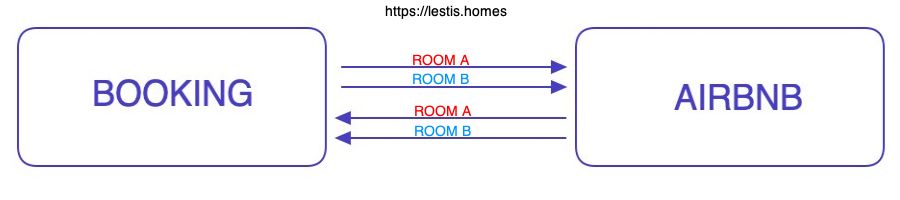
Visualization of the iCal flow between Airbnb and Booking for each rentable unit
Configuration between Airbnb and Booking
Follow these steps to directly connect the two most popular platforms.
Important
- When talking about an iCal calendar, each UNIT/LISTING/PROPERTY has its own availability calendar
- By "export" we mean retrieving the link to be provided to another platform
- By "import" we mean saving on that platform the link coming from an external website
Airbnb
- If you are not using a laptop/desktop, you may want to read the dedicated article
- Click on Calendar and select the listing calendar you want to modify.
- Click on Availability.
- In the Connect calendars section, click Connect to another website.
- To export the calendar, copy the Airbnb calendar link and paste it into the iCal-based platform.
- Then, to import a calendar, obtain a link ending in .ics from the other site and paste the URL into the calendar address field.
- Assign a name and click Add calendar.
Booking
If you don't want to watch the video, here is the dedicated article
Follow the official video tutorial for calendar synchronization.
Add Lestis to your ecosystem
To synchronize availability from other platforms on your Lestis website, you need to connect Lestis to the other OTAs
📤 Export from Lestis
Process to be performed for each rentable unit:
- On Lestis, go to Dashboard → Properties → Units → Calendars (iCal).
- Copy the link from Unit Calendar URL (Export) or click "Copy link"
- Paste it as an "import" into all OTA platforms you use, in the calendar of that specific unit
📥 Import into Lestis
Process to be performed for each OTA used, for each rentable unit
- Take the "Export" link from Airbnb, Booking, etc.
- On Lestis, go to Dashboard → Properties → Units → Calendars (iCal).
- Paste it into the Remote iCal Calendar URLs (Import) section and give it a name.
For each calendar you will see the exact time of the last synchronization and, if present, any synchronization errors
You know how to synchronize calendars, but don't know Lestis yet?
Take a look at what we've prepared for you